Your desktop knows which agent needs you

A liquid-glass Hyprland desktop and Dynamic Island built for coding agents, reviewed system updates, and calm focus.

Atmospheric desktop wallpaper from imageory.in
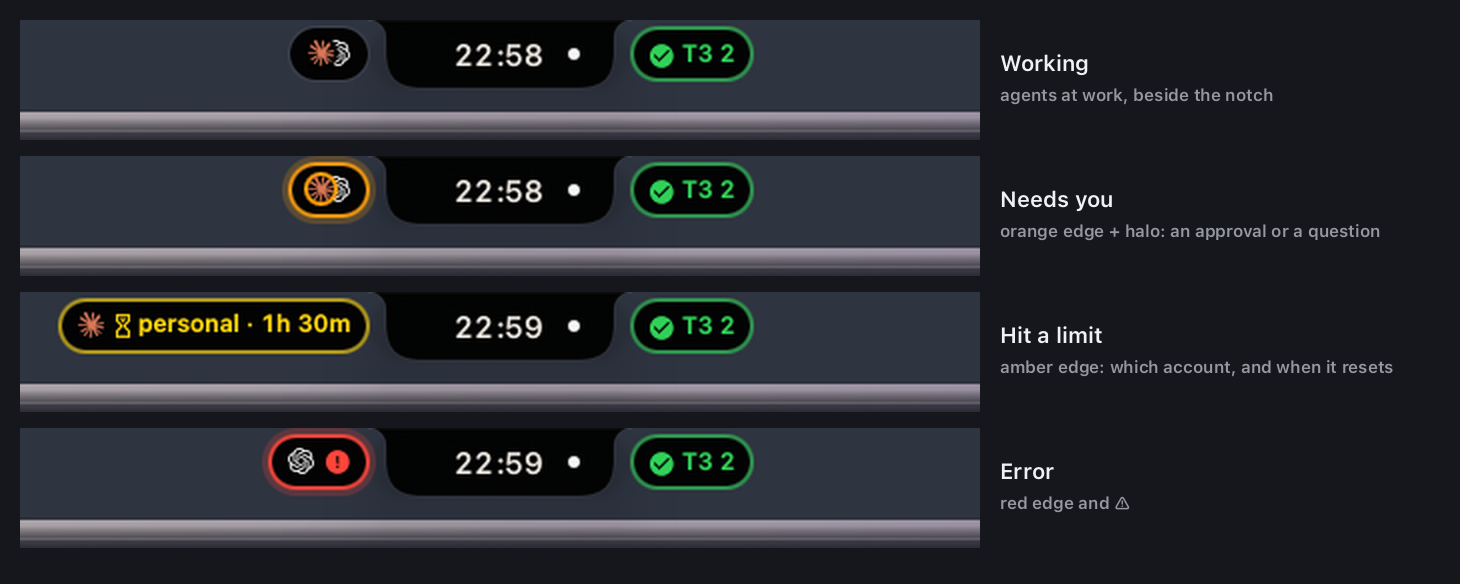
Dedicated approval capsuleWaiting prompts get an orange halo beside the notch while active agents stay quiet.

Approve agent work without switching windows

When Claude Code, Codex, or T3 Code runs across multiple terminals, conventional status bars bury the one prompt waiting on you. kuwai splits attention into focused capsules around a centered clock so you read state in a single glance.

Waiting approvals surface in their own orange capsule beside the notch while active agents stay calm next to it. Decisions route through native permission hooks with zero synthetic keystrokes, falling back to your terminal prompt after 45 seconds if you stay focused elsewhere.

  • Dedicated approval capsule: orange attention halo for waiting prompts; click once to jump directly to the pane.
  • Unified quota countdown: leads with whichever provider resets soonest across Claude, Codex, Antigravity, Cursor, Grok, Gemini, and multi-profile Devin accounts.
  • Respectful interruption rules: critical approvals surface over fullscreen windows, while Focus and screen-share modes stay completely quiet.
Live kuwai island capsule states showing Working, Needs you, Hit a limit, and Error
Live shell captures: Working, Needs you, Hit a limit, and Error capsule states.
Native permission hookFallback to terminal in 45s

Claude Code in pane 2 asks to run:

git rebase --onto main feature/island-polish~2
Built for your daily stack
Hyprland 0.57 Quickshell Claude Code OpenAI Codex T3 Code Devin CLI kitty

Engineered for daily-driver reliability

Every milestone promoted to the stable channel passes automated unit, token, and visual regression gates. Browse the full release changelog or follow via RSS.

0 / 0 / 0 / 0 / 0

Every surface driven by one token & easing system

Replaced 297 hardcoded sizes, durations, and hex values plus all 74 literal Qt easings with one design token table and cubic-bezier curve set that scales cleanly up to 200% text size.

Automated token & easing gate

1 draw call

Single-pass SDF liquid glass & zero-Hz hover

GlassCard renders tint, outer dark ring, top sheen, directional top-left/bottom-right specular rim, and procedural grain in one compiled .qsb shader pass, while FluidHighlight tracks geometry signals at 0 Hz when stationary.

glasscard.frag.qsb · 7 wakeups/s
0 layer leaks

Pure .mjs state machines & strict UI boundaries

Extracted unit-tested reducers for overlays, settings writes, island proximity, and audio/DAC hotplugs (515+ Bun tests), drove component-to-service imports to 0/0/0, and wired keyring-backed T3 approvals right into the notch.

kuwai-layers 0/0/0 · 515 Bun tests
1.1 s recovery

Supervised shell with zero orphaned helpers

Running kuwai as a dedicated user service with strict child teardown eliminated 127 lingering background processes and recovers automatically from crashes.

Automatic fallback session
11 themes

Standalone atomic theming engine

Switch palettes and wallpapers atomically with built-in WCAG contrast verification, custom templates, and zero third-party theme framework lock-in.

Single-writer palette swap
161 MB idle

Static optical fonts, gated daemons & clean idle

Static Inter and SF Pro optical cuts, conditional startup for optional daemons, FileView-watched package status, and pruned caches bring the live shell down to 161 MB RSS and 0% idle CPU.

Live kuwai-check budget
138 frames

Zero-warning visual rehearsal before every release

Every island panel is rendered across 100%, 120%, and 200% text scales with automated contrast, clipping, and type-scale verification before updates reach the stable channel.

0 wrong · 0 notices
10 providers

Live quota awareness & inline approvals across agents

Tracks Claude, OpenAI Codex, Antigravity, Cursor, Grok, Gemini, and multi-profile Devin accounts in one calm reset countdown — with inline Allow/Deny for waiting T3 and terminal agents.

Keyring-first local discovery

Liquid glass built from one primitive per job

Hyprland blurs live windows behind every translucent layer while Quickshell draws dark tint, specular rim lighting, and critically damped springs from one shared component grammar.

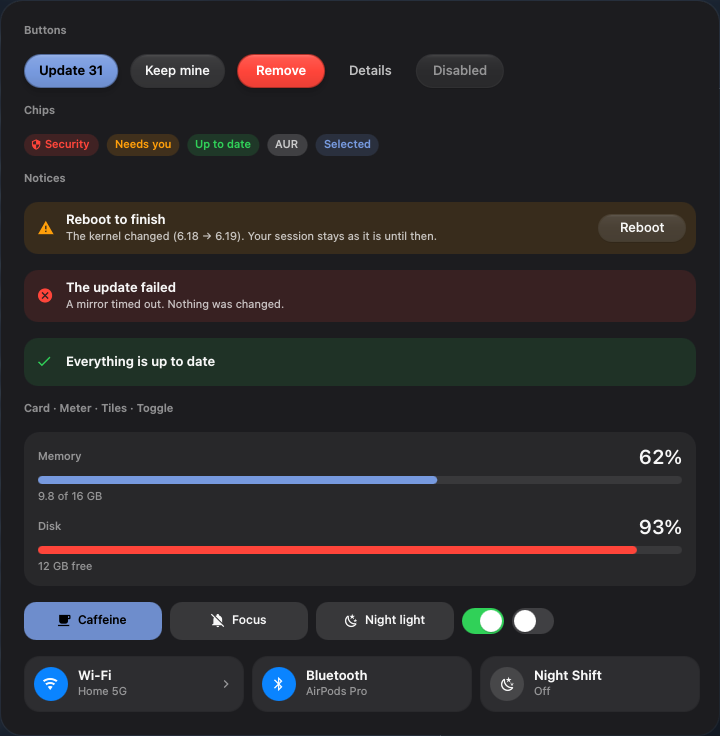
kuwai UI primitives gallery showing buttons, notices, meters, toggles, and control tiles

One visual grammar across every surface

Buttons, notices, meters, toggles, and Control Center tiles inherit the exact same liquid-glass tokens, 140 ms press response, keyboard focus rings, and screen-reader roles.

Typography
Inter optical sizes by default, upgrading automatically to SF Pro when present
Motion
Critically damped springs with FreeType native glyph rendering
Accessibility
200% text scaling, high-contrast surfaces, and fade-only reduced motion

Every surface one keystroke away

Global shortcuts route directly into the running shell with zero subprocess lag, and every panel shares consistent arrow, tab, and escape navigation.

SuperA

Launcher, processes, and ports

Launch apps, math, timers, reminders, or type ! 3000 to inspect and stop a listening server.

SuperV

Clipboard island

Search copy history with fuzzy matching, Quick Look previews, inline editing, OCR, and automatic secret masking.

SuperN

Notification and control center

Grouped app notifications with undo clear, per-app audio mixer, Wi-Fi, Bluetooth, Night Shift, and Caffeine.

SuperShiftN

Agents overview

Every active kitty pane and T3 Code thread in one list, sorted with waiting approvals at the top.

SuperCtrlEnter

Answer active island card

Act directly on a ringing alarm, due reminder, or waiting prompt without reaching for the pointer.

SuperCtrlI

Live settings

Adjust appearance, motion, displays, power, privacy, and updates with instant apply and per-row reset.

How much faster and leaner we can go

Measured resource headroom on real hardware alongside the next wave of features on our road to a zero-friction public release.

Active session footprint: 3.17 GB active (1.74 GB idle) vs 1.25 GB target

Hover or select any segment to inspect where desktop memory goes and what the next architectural levers reclaim.

-1.9 GB + dGPU sleep
AreaMeasured todayTargetHow we get there
Idle memory & dGPU sleep18 MB idle RAM, dGPU stays activedGPU suspended + 1.25 GB idleMove speech inference into an on-demand worker so CUDA releases the card, socket-activate containers, and cool closed panel loaders.
Idle GPU wakeupsShipped · 7 wakeups/s (0 Hz hover)Enforced in kuwai-checkFluidHighlight now tracks ancestor geometry and swipe transforms via Qt.callLater, and audio peak capture pauses when hidden, locked, or under reduced motion.
Standalone portability33 non-adapter HyDE hooks leftClean Arch VM installPersonal DAC/GPS/hwmon defaults removed and optional daemons gated; isolating the remaining HyDE hooks into the 5 adapters finishes clean-VM portability.
State reliabilityShipped · 4 pure .mjs reducers100% pure component layersOverlay lifecycle (Center, Clipboard, Assistant), Settings writes, Island proximity, and Osd DAC hotplugs now run on Bun-tested reducers with 0/0/0 layer leaks.
Login transition2.8 s compositor handoverOne continuous revealMask greeter background audio services, decode at native monitor resolution, and finish with a 400 ms boot reveal.

Questions before you install

Direct answers on session safety, fonts, privacy, and recovery.

Will kuwai overwrite my existing Hyprland configuration?

No. kuwai writes its Hyprland configuration to ~/.config/kuwai/hypr/ and registers its own login session, leaving ~/.config/hypr untouched. Any file it replaces is backed up and restored automatically by ./install.sh --uninstall.

Do I need HyDE or Apple's SF Pro font installed?

Neither is required. kuwai ships its own standalone atomic Look engine with 11 bundled themes and uses Inter (open-source OFL, installed automatically from Arch repos) with optical sizing. If SF Pro is present on your machine, kuwai upgrades typography automatically.

How do agent approvals work without typing into my terminal?

Approval actions route through native PermissionRequest hooks for Claude Code and Codex. Your decision goes straight to the hook with zero synthetic keystrokes, and only appears for single-line commands you can read in full. Ignored prompts fall back cleanly to the terminal after 45 seconds.

How much memory and CPU does the desktop shell use at idle?

A fresh stable shell starts near 207 MB and settles between 207 and 350 MB at idle under 2% CPU. Surfaces unmount when hidden, streaming helpers terminate with the shell via pdeathsig, and our upcoming boot optimization cuts full-session boot memory by 73%.

What happens if an edit or update breaks the shell?

kuwai runs from a supervised systemd service on the stable channel. Promotions run automated unit, token, and 141-frame visual checks first, roll back automatically within 4 seconds if a load fails, and fall back to a rescue bar if anything ever crashes repeatedly.

Install kuwai beside your existing session

kuwai installs its Hyprland configuration into ~/.config/kuwai/hypr/ as a separate login session, leaving your existing ~/.config/hypr untouched. Every change is backed up and cleanly reversible.

Arch Linux with Hyprland 0.57
git clone https://github.com/KitsuneKode/kuwai.git ~/Projects/kuwai
cd ~/Projects/kuwai && ./install.sh --dry-run
./install.sh --deps
bin/kuwai doctor

Optional: run sudo greeter/install for the unified greetd login screen and sudo system/install for wake-from-sleep alarms.